Paid events and add-ons
Paid events: plans, add-ons and credits
Events are free until you need more. You pay once for the event that needs it, not monthly, and every other event stays as it is.
Updated
How pricing works
- A plan belongs to one event. It is a one-time payment with no renewal.
- The five plans unlock the same features. They differ only in how many RSVPs the event can show.
- Three add-ons (Table Management, RSVP Fee, Marketing Email) are bought separately for the events that need them.
- Credits are a prepaid way to pay for any of it, at a discount.
| Plan | RSVPs per event | Price | Or credits |
|---|---|---|---|
| Free | 20 | $0 | 0 |
| Starter | 75 | $7 | 1 |
| Basic | 250 | $15 | 2 |
| Standard | 500 | $24 | 3 |
| Pro | 750 | $32 | 4 |
| Premium | 1,000 | $39 | 5 |
What a paid event unlocks
| Feature | Free event | Paid event |
|---|---|---|
| Customize theme pages | Yes | Yes |
| Design-your-own photo invitation | Yes | Yes |
| QR code download | Yes | Yes |
| RSVPs per event | Up to 20 | 75–1,000 |
| Maximum events | 5 | Unlimited |
| Custom URL link | No | Yes |
| Remove brand logo | No | Yes |
| Event managers | No | Yes |
| Sign-Up List | No | Yes |
| Table Management | No | Yes |
| Custom questions | No | Yes |
| RSVP Fee (P2P payment) | No | Yes |
| Marketing Email | No | Yes |
| Intro reveals | No | Yes |
| Invite email tracking | No | Yes |
| Host notification emails | Yes | Yes |
| Guest limits & capacity | No | Yes |
| Daily RSVP summary | No | Yes |
| Priority support | No | Yes |
| Postcard discount | List price | 5–20% off |
| Print cards at home | No | Yes |
Table Management, RSVP Fee and Marketing Email are add-ons on top of any paid plan: $6 or 1 credit each (Marketing Email is per pack of 500 emails).
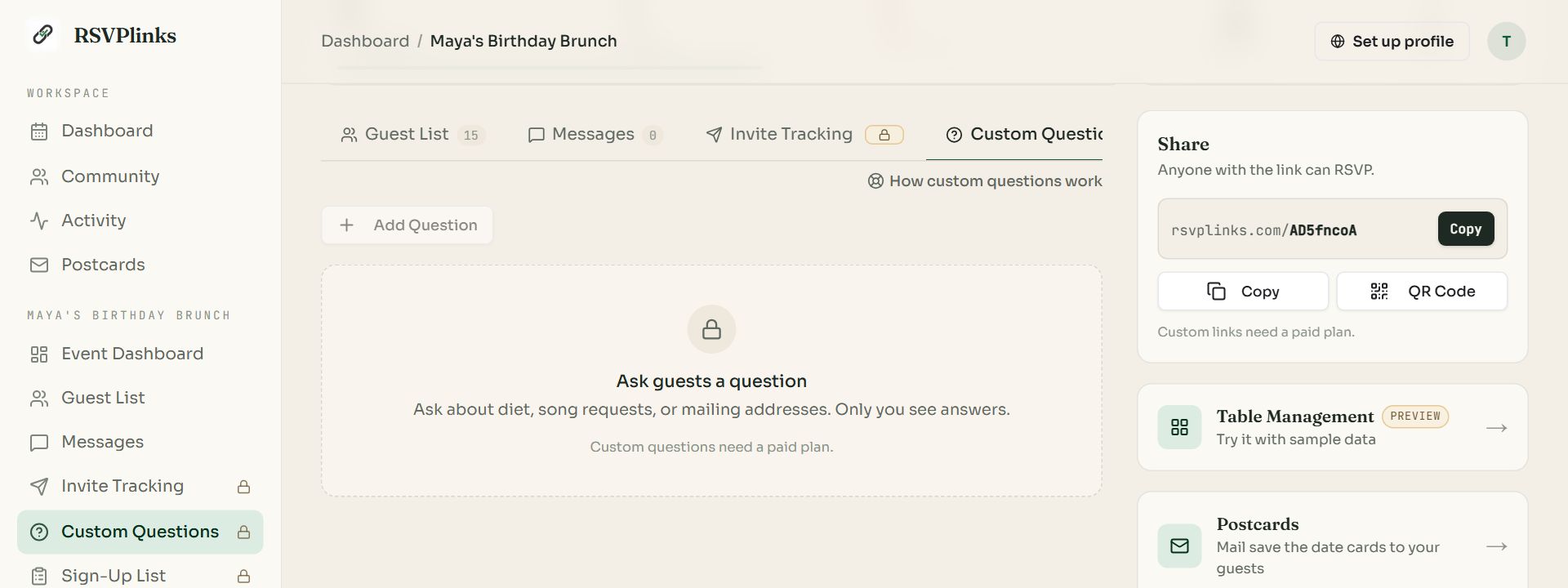
Swipe sideways to see the whole screen, or tap it to enlarge.
On a free event, paid features show a padlock. You can open them to see what they do.
- 1A padlock marks a feature this event has not unlocked.
Upgrade an event
Open the event's dashboard and find Upgrade this event on the right (press Upgrade on the cover to jump to it).
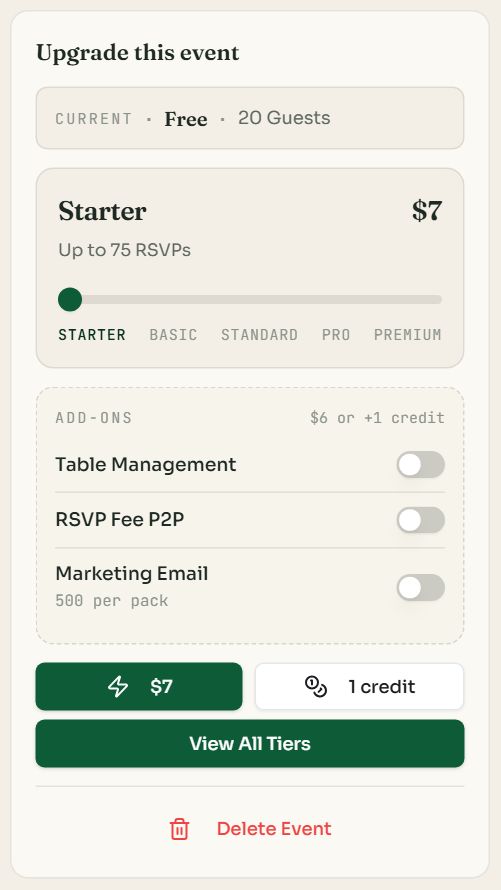
- 1The plan slider. Drag to the plan whose RSVP limit fits your guest list.
- 2Add-ons. Switch on any you want to buy in the same step.
- 3Pay by card. The price button opens a secure checkout.
- 4Pay with credits. Uses credits from your balance instead.
- 5View All Tiers opens the pricing page with this event selected.
- The upgrade applies immediately. Hidden RSVPs appear and locked tabs open.
- Upgrading again later costs only the difference. Going from Starter to Basic is the Basic price minus what you paid for Starter, or one more credit.
- Only the event's owner can change its plan. Co-hosts cannot.
- A receipt is emailed, and purchases are listed under Settings, Billing.
Add-ons
| Add-on | What it does | Price |
|---|---|---|
| Table Management | A seating chart with a find-your-table page for guests. More | $6 or 1 credit |
| RSVP Fee | Ask guests to pay you when they reply. More | $6 or 1 credit |
| Marketing Email | Email invitations to a contact list. More | $6 or 1 credit per 500 emails |
An add-on is for one event and needs that event to be on a paid plan. Buy it from the upgrade card or on the pricing page. More Marketing Email packs can also be bought from that tab.
Credits
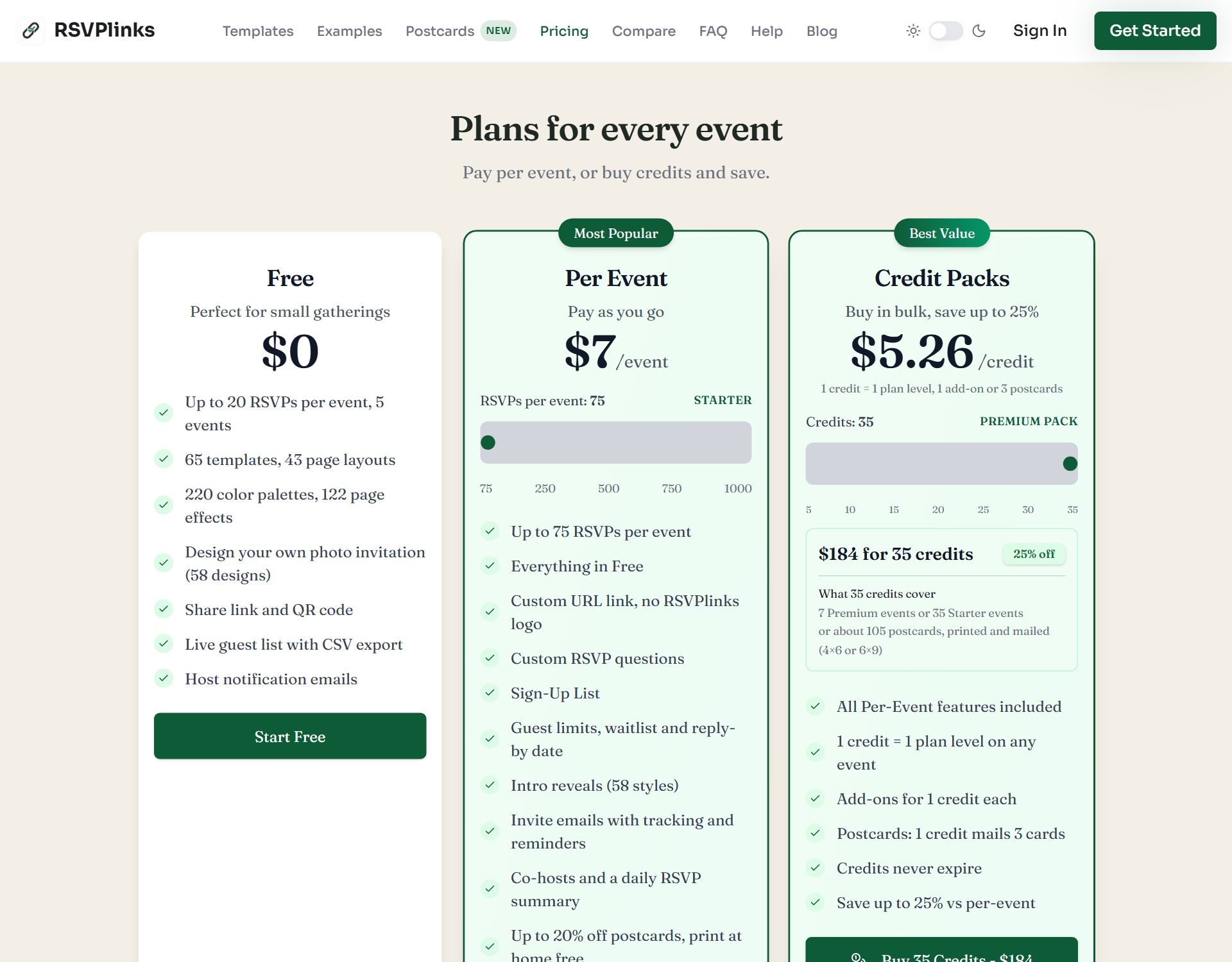
Swipe sideways to see the whole screen, or tap it to enlarge.
The pricing page. Per Event pays for one event; Credit Packs prepays for several.
- 1 credit = one plan level on any event, one add-on, or 3 mailed postcards.
- Starter costs 1 credit, Basic 2, Standard 3, Pro 4, Premium 5.
- Packs run from 5 credits ($33) to 35 credits ($184). Bigger packs save up to 25% against paying per event.
- Credits never expire and work on any of your events.
- Your balance shows at the bottom of the navigation pane and in the account menu.
If more guests reply than your plan shows
Nobody is turned away by the plan limit. Guests can keep replying. The replies past your limit are saved and hidden, with a notice on the guest list, and they appear as soon as you move the event to a bigger plan. To actually cap attendance, set a guest limit in RSVP Settings.
Common questions
- Is RSVPlinks free?
- Yes, for events with up to 20 RSVPs. A free account holds 5 free events with every template, layout, color theme and page effect, plus the share link, QR code and guest list.
- Is there a monthly subscription?
- No. Paid plans are a one-time payment per event, from $7 to $39. Nothing renews.
- Which plan do I need?
- Pick by guest list size. Every paid plan has the same features; Starter shows 75 RSVPs, Basic shows 250 RSVPs, Standard shows 500 RSVPs, Pro shows 750 RSVPs, Premium shows 1,000 RSVPs. You can start low and upgrade for the difference.
- Do credits expire?
- No. Credits stay on your account until you use them, on any event.
- What happens to RSVPs over my plan's limit?
- They are saved but hidden from the guest list. Upgrade the event and they show immediately. Guests are never told the event is over a plan limit.
Still stuck?
Check the FAQ for quick answers, or send us a message and a person will reply.