Paid events and add-ons
RSVP Fee: collect payment with RSVPs
RSVP Fee asks each guest to pay you when they reply. Guests pay you directly in an app they already use, and you mark each payment received. RSVPlinks never holds the money and takes no cut.
Updated
Before you start
First tell RSVPlinks where guests should send money. Open Settings, Billing, Payment Information.
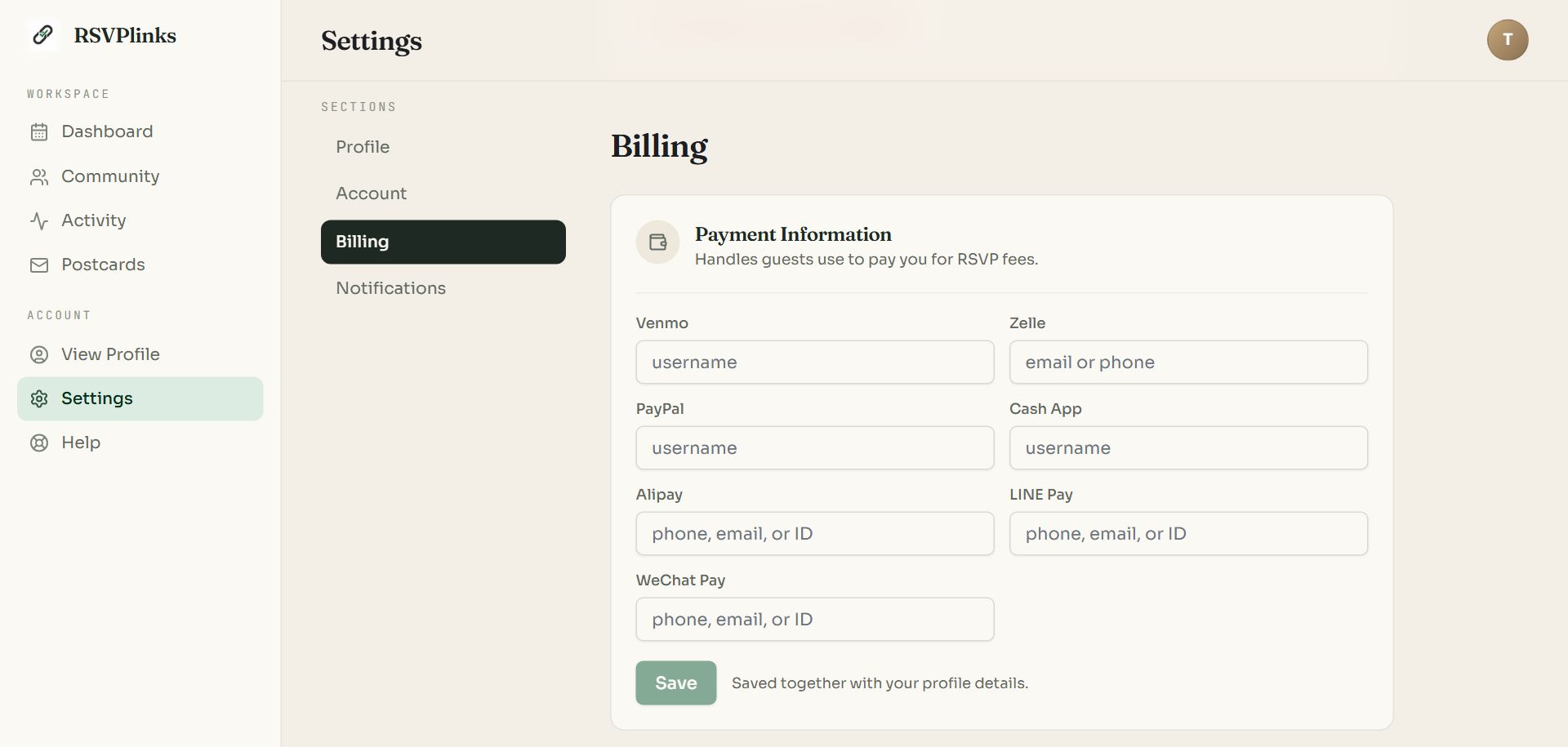
Swipe sideways to see the whole screen, or tap it to enlarge.
- 1Payment Information. Enter your username for each app you accept: Venmo, Zelle, PayPal, Cash App, Alipay, LINE Pay or WeChat Pay.
- 2Save. A method can be offered to guests only once it has a handle here.
Turn it on and set the price
Open the event's dashboard and choose the RSVP Fee tab.
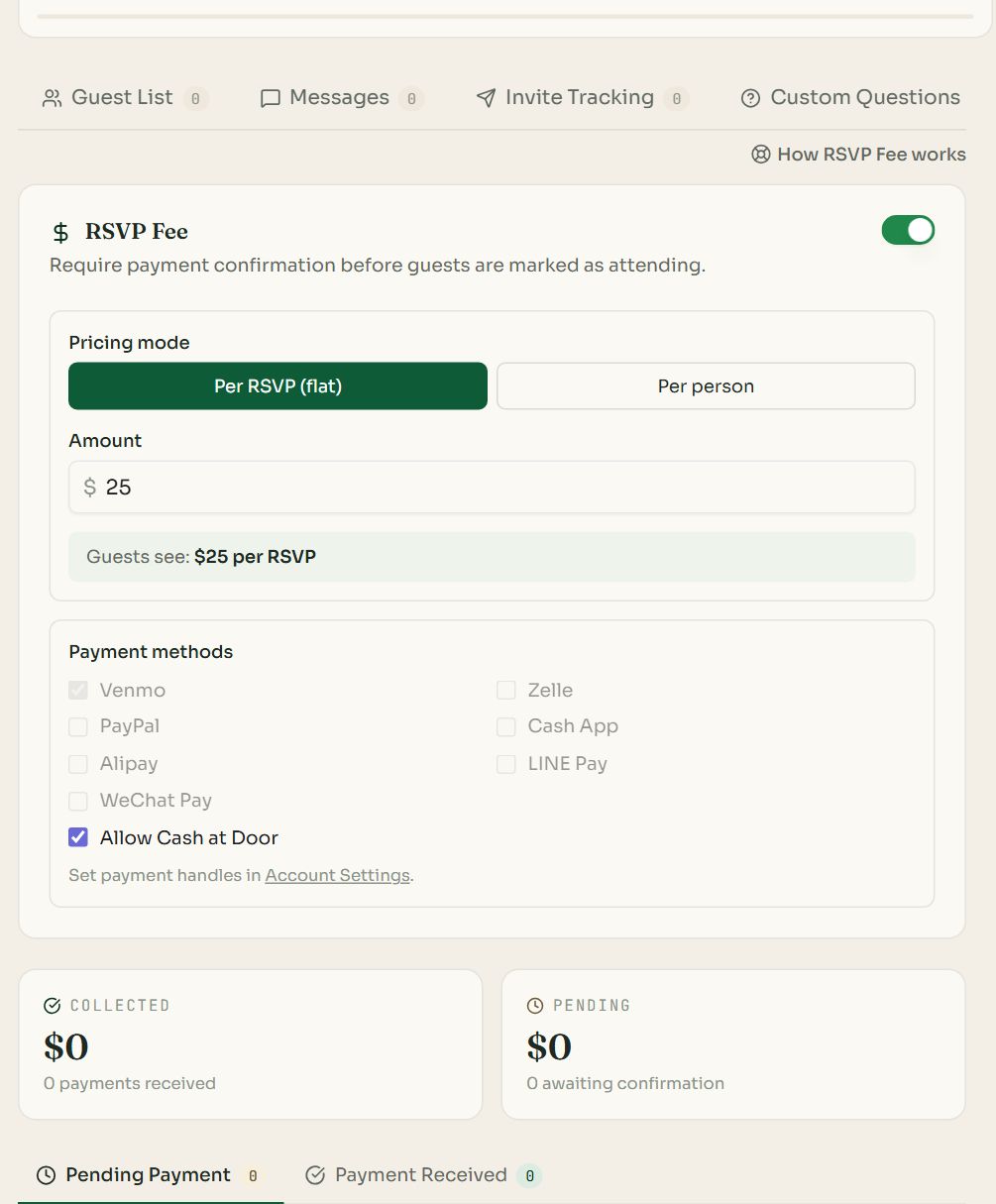
- 1The switch turns the fee on for this event.
- 2Pricing mode. Per RSVP (flat) charges once per reply. Per person multiplies by the party size.
- 3Payment methods. Tick the ones to offer. Allow Cash at Door lets guests choose to pay in person.
- 4Collected and Pending total the money so far.
- 5Pending Payment and Payment Received list the guests in each state.
- Type the Amount. The line under it, “Guests see: $25 per RSVP”, shows the wording on the form.
- For a lower price for children, choose Per person and switch on Adults + Kids Counters in RSVP Settings. An Adult amount and a Child amount then appear.
- Turning the fee on also makes email required on the form, so guests can be sent their confirmation.
What guests do
- 1
They see the fee on the form
The form shows the price and a Total due worked out from their party size.
- 2
They pick a payment method
They choose one of the methods you offer and enter their own username for it, so you can match the payment.
- 3
They pay you
The form shows your handle. For Venmo, PayPal and Cash App it also shows a QR code and a link with the amount filled in. Zelle and the others show your handle to pay by hand.
- 4
They are marked Pending Payment
Their place is held, and they are told the RSVP is pending until you confirm.
Approve payments
- 1
Check your payment app
Look for the payment from the username the guest gave.
- 2
Press Approve
On the RSVP Fee tab, under Pending Payment, press Approve beside the guest. The tick on their row in the Guest List does the same.
- 3
The guest is confirmed
They move to Attending and are emailed a confirmation code. The row moves to Payment Received with that code, which you can check at the door.
- Payments waiting for you also appear under Activity, Payments.
- Guests with a pending payment count toward any guest limit, so a place is not given away while they pay.
- Refunds are between you and the guest, in the payment app. To release their place, edit their reply to Declined or delete it.
Common questions
- Does RSVPlinks take a percentage of the fee?
- No. Guests pay you directly through Venmo, Zelle, PayPal, Cash App or cash. RSVPlinks charges only the $6 (or 1 credit) add-on for the event.
- Can I charge a different price for kids?
- Yes. Choose Per person, switch on Adults + Kids Counters in RSVP Settings, and enter an adult amount and a child amount. The form totals each party automatically.
- How do I know who has paid?
- Each guest enters the username they pay from. Match it in your payment app, then press Approve. The tab totals what is collected and what is still pending.
- Can guests pay by credit card?
- Not through the RSVP form. The fee is paid person to person in the apps you choose, or in cash. Guests can fund Venmo, PayPal or Cash App with a card on their side.
- Is a guest counted before they pay?
- They show as Pending Payment and hold a place toward your limit. They become Attending when you approve the payment.
Still stuck?
Check the FAQ for quick answers, or send us a message and a person will reply.