Any paid plan · from $8 per event, no subscription
An RSVP form with a waitlist
Set a limit on guests or replies. Once your event is full, new RSVPs join a waitlist in the order they arrive, and when someone cancels the spot goes to the next guest in line: you press Promote, or let it happen automatically.
Where the limit and the waitlist live
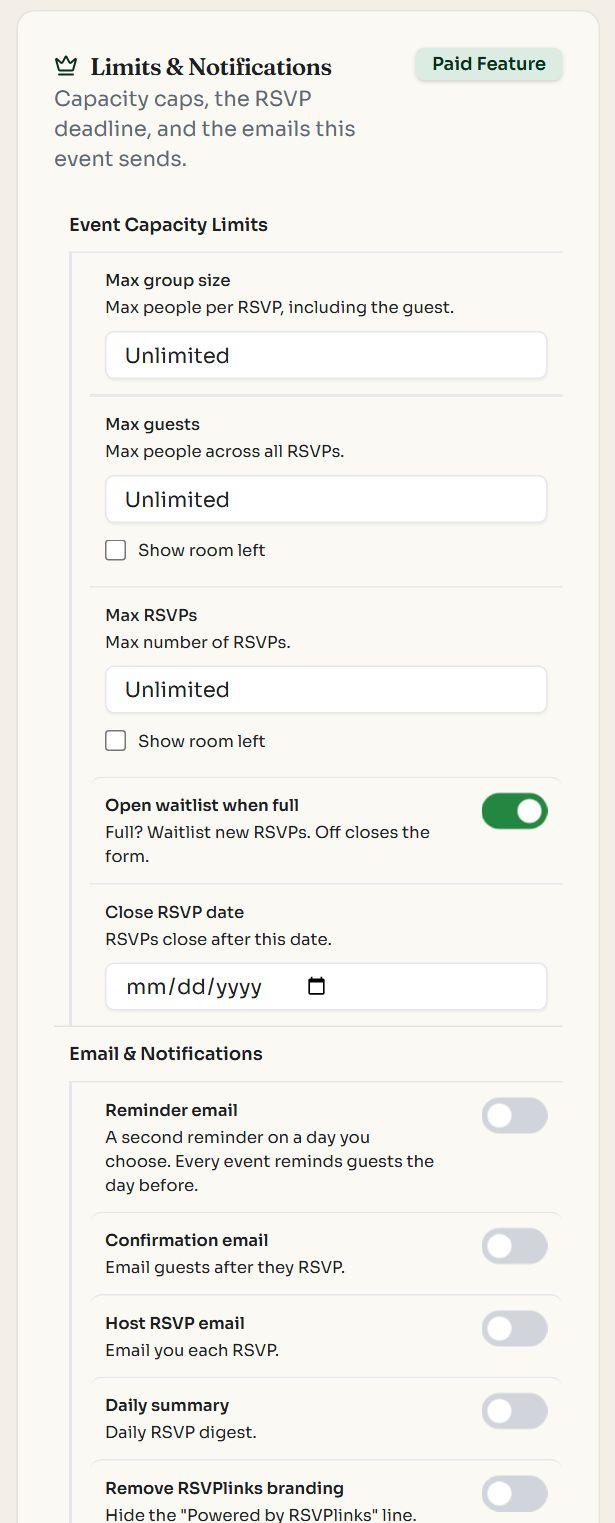
Max guests, Max RSVPs and Open waitlist when full 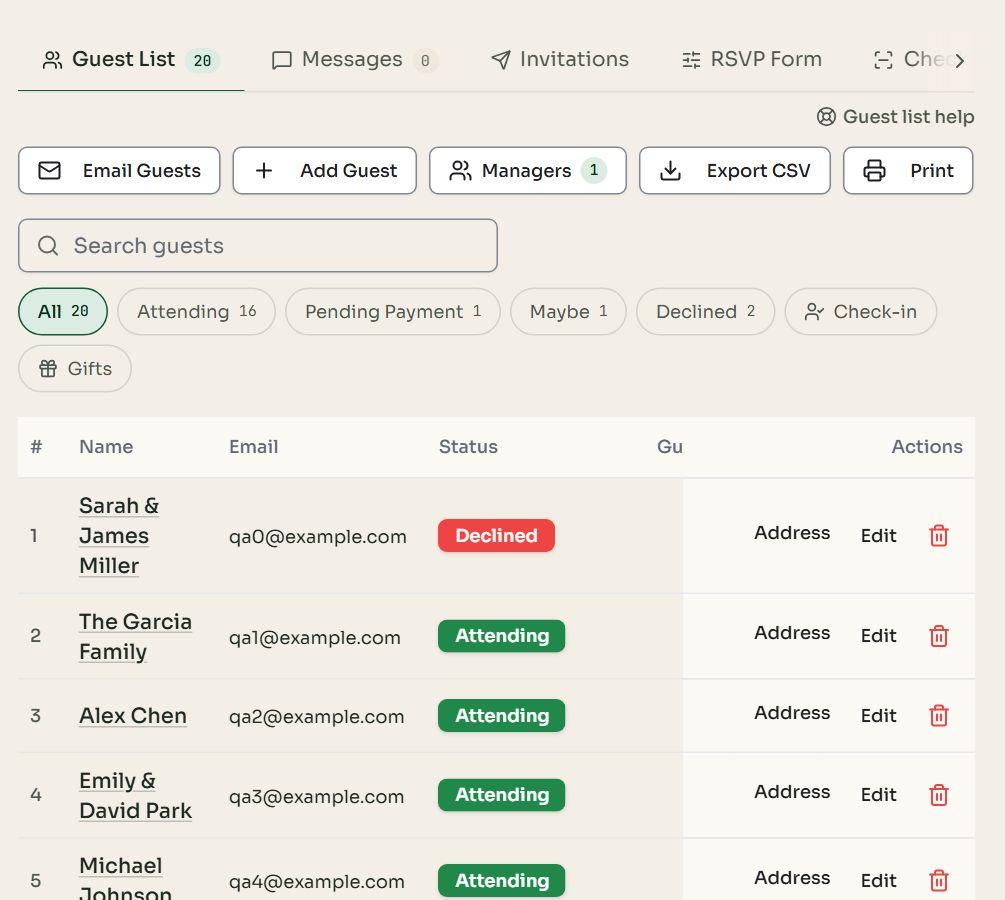
Every reply and its status in your guest list
Designs for events with limited spots
Monthly Meetup
Registration
A one-page run of show with a Join button for your regulars and new faces.
A limit in people or in replies
Max guests counts everyone in each party, Max RSVPs counts replies, and Max group size caps one party. Show room left prints the spots left beside the form.
First come, first served
Replies join the waitlist in the order they arrive. While anyone is waiting, a new reply can't take a freed spot ahead of them.
Promote by hand or automatically
Press Promote on a waitlisted row, or turn on automatic promotion: when someone cancels, the next reply that fits gets the spot.
Guests hear straight away
The waitlist screen and email say spots go in order, and a promoted guest is emailed that a spot opened up.
How it works
- 01Create your event and give it a paid plan (from $8, once for the event).
- 02In the RSVP settings, set Max guests (people across all replies), Max RSVPs, or both. Tick Show room left to show the spots left beside the form.
- 03Leave Open waitlist when full on. A reply that doesn't fit joins the waitlist; turn it off and the form closes instead.
- 04When a guest changes to Can't Go, press Promote on the next waitlisted guest, or switch on automatic promotion so the earliest reply that fits gets the spot and an email saying so.
For classes, dinners, tours and any party with a guest limit
Start free; add a paid plan when you set a limit. Every design is free on every event.
Signing people up for a class? See the event registration page.
Questions
Is the waitlist free?
Limits and the waitlist come with any paid plan for the event, from $8, paid once with no subscription. On a free event you can still close the form by hand at any time, or on a reply-by date.
What counts toward the limit?
Max guests counts every person in each Going reply (and replies waiting for payment); Max RSVPs counts the replies themselves. Maybe and Can't Go don't take a spot. Set either one, or both, and the closer to full decides.
Does someone on the waitlist get in on their own?
Only when you say so. Press Promote on their row in the guest list, or switch on automatic promotion and the earliest waitlisted reply that fits takes each spot that opens. A guest's own reply never skips the line.
What if a waitlisted party is too big for the spot that opened?
Automatic promotion skips a party that doesn't fit and takes the next one that does. By hand you can still promote a bigger party and go over your limit, after a warning.
Can a waitlisted guest change their reply?
Yes. If they still say they're coming they keep their place in line; if they change to Maybe or Can't Go they leave the waitlist.
Are guests told they're on the waitlist?
Yes, on screen as soon as they reply, and by email if they gave one. When you promote them they get an email that a spot opened and they're going.
Can I close the form instead of keeping a waitlist?
Yes. Turn off Open waitlist when full and the form closes once the event is full.
What can't it do?
Guests aren't shown their number in line, and a limit covers the whole event: an event split into parts (a ceremony and a reception) can't cap each part on its own. For several ticket types with their own stock, use Tickets instead.