Print & editorial template
Poster invitation template
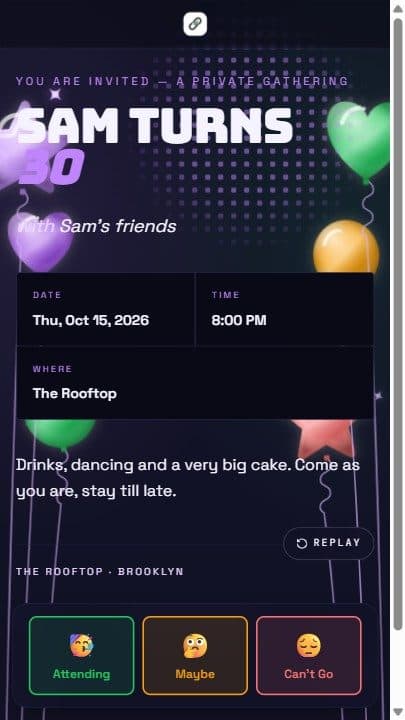
Bold dark gig poster — oversized display type.
Bold dark gig poster with oversized display type and a horizontal meta strip. Every piece below is pre-paired for you and stays editable after you start.
Free to start · No credit card · No app for your guests

What's in the Poster template
Picking this template opens the event editor with all six choices already made, so you only fill in your own details. Swap any of them at any time.
- Page layout
- Poster
- Bold dark gig poster with oversized display type and a horizontal meta strip.
- Color palette
- Midnight Vows
- Midnight navy with soft gold
- Title font
- Bungee
- Arcade
- Body font
- Space Grotesk
- Tech / Gaming
- Page effect
- Sunrise Wash
- Warm horizon gradient breathing up and down like a slow sunrise
- Intro reveal
- Spotlight sweep
- Stage spotlight sweeps across to reveal.
Best for
Concerts, DJ nights, club events, product launches, and anything loud enough to deserve a poster.
Not quite right? Browse all 65 invitation templates or start from a blank event page.
What every event page includes
- A shareable invitation link plus a QR code for printed invites
- Real-time RSVP tracking with a guest list you can export
- Add to Calendar for Google, Apple, Outlook, Microsoft 365, and Yahoo
- One-tap directions in Google Maps or Apple Maps
- Custom RSVP questions, guest counts, and an optional maybe reply
- Mobile-first pages — guests never download an app or sign up
How to use the Poster template
- 1
Open the template
"Use this template" opens the event editor with the Poster layout, Midnight Vows palette, fonts, page effect, and intro reveal already applied.
- 2
Add your details
Type your title, date, time, and venue over the sample content. Add a photo, custom RSVP questions, or a potluck sign-up list if you want them.
- 3
Share the link
Publish and send the link or QR code. Replies land on your dashboard in real time, and guests can save the date to their calendar in one tap.
Templates like Poster
More designs from the print & editorial family and beyond.
Poster template questions
- Is the Poster invitation template free?
- Yes. You can build and share an event page with this template for free — the free tier covers 20 RSVPs per event across up to 5 active events. Paid upgrades raise the RSVP cap per event and are billed once, not as a subscription. The one paid-only piece of this template is the intro reveal animation, which free hosts can preview but not keep.
- Can I change the colors and fonts after picking the Poster template?
- Yes — a template is a starting point, not a constraint. It opens the editor with the Poster layout, the Midnight Vows palette, Bungee titles, and Space Grotesk body text already applied, and every one of those is swappable from Event Settings without losing your content.
- Do my guests need an account or an app to RSVP?
- No. Guests tap your link, see the invitation, and reply on the page — no sign-up, no download. Every event page also has one-tap Add to Calendar (Google, Apple, Outlook, Microsoft 365, Yahoo) and opens the venue in Google Maps or Apple Maps for directions.
- What kind of events suit the Poster template?
- Concerts, DJ nights, club events, product launches, and anything loud enough to deserve a poster.
More answers on the FAQ, or see how RSVPlinks compares to other invitation tools.